
NetPrime
1 Hour Ago
14.1 MB
16.0
Android 6.1+
12.11M+

Description
Watching a full movie is not always the plan. Sometimes you want a series, a comedy show, or a short drama instead. NetPrime brings these choices together in one Android-focused entertainment app. Its current Google Play listing describes movies, TV shows, trending short dramas, title search, categories, favorites, HD streaming support, and regular content updates.
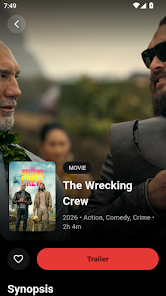
What Is NetPrime APK?
NetPrime APK is an Android entertainment application made for browsing movies, TV shows, web series, and short dramas. Instead of focusing on one type of video, it brings several formats into the same interface. This makes it easier to switch between different types of entertainment. The app is aimed at people who enjoy variety when choosing what to watch.
The content range covers familiar genres such as action, comedy, thriller, animation, and family entertainment. Users can browse categories when they do not have a specific title in mind. They can also search directly when they already know what they want. This simple approach makes finding something suitable much easier.
The current Google Play listing also highlights a lightweight Android design, HD quality streaming support, favorites, and regular content updates. It lists the app under Entertainment, with 5K+ downloads at the time of checking. The listing was updated on
Main Features of NetPrime
Movies, TV Shows, and Short Dramas
The biggest attraction is the mix of video content. You can move from a full-length movie to a television show or a short drama without changing the basic browsing experience. Short-form stories are useful when you only have a few minutes. Longer movies and series work better when you have more free time.
The app also groups entertainment by type and genre. So, you can look for action when you want something exciting or choose comedy for a lighter watch. This gives users more freedom instead of pushing them toward one content style.
Search and Category Browsing
Searching is useful when you already have a title in mind. Entering the name can save time compared with scrolling through a large collection. Category browsing offers the opposite experience. It helps when you are simply looking for something interesting.
The current listing confirms that users can search by title or category. This makes discovery practical for both specific searches and casual browsing.
Favorites for Later
Finding several good titles can create a small problem. You may want to watch them all, but there may not be enough time. The favorites feature gives you a simple way to keep selected titles together.
Instead of searching for the same movie again, you can return to your saved list. This is especially useful for people who often discover content while browsing but prefer watching it later.
HD Streaming Support
The app supports HD-quality streaming for compatible content. Better resolution can make movies and shows look sharper on modern phone screens. However, actual playback quality can depend on the available source and your internet connection.
A stable connection also matters for smooth viewing. If the network becomes weak, playback may take longer to load or adjust quality.
Simple Android Interface
The application focuses on common actions such as browsing, searching, selecting, saving, and watching. This keeps the learning curve fairly low for new users. The Google Play listing describes it as clean, modern, lightweight, and optimized for Android devices.
How NetPrime Works?
Finding Content
Start by opening the app and checking the available categories. You can also explore popular selections or search for a particular title. Once you find something interesting, open its details and check the available viewing option.
This gives you two easy ways to discover content. Search works best when you know the title. Categories are better when you are simply browsing.
Saving a Movie or Show
If you find something worth watching later, add it to your favorites. Your saved titles can then act as a personal shortlist. This saves time when you return to the app.
It can also help separate titles you genuinely want to watch from those you only opened out of curiosity.
Watching Online
The application is designed around online video playback. This means an internet connection is important for streaming. Your experience can change depending on network speed, device performance, and the availability of the selected content.
The project’s GitHub information also states that its version of the app does not store media files on its own servers and relies on third-party services for media.
NetPrime APK for Android
The Android version is designed around mobile viewing. Its main controls focus on finding content quickly and getting to playback without unnecessary steps. This makes it suitable for short viewing sessions as well as longer movie nights.
The current Google Play version is published by YEARD LLC and contains ads. Google Play currently shows 5K+ downloads and a 2.8-star rating from 13 reviews. These figures can change as more people use the app.
There is also a separate open-source project using the NetPrime name on GitHub. That project lists React Native, Expo, TypeScript, React Navigation, Axios, Expo Router, Reanimated, and WebView among its technologies. Because different products can share the same name, users should check the developer and package details before installing an APK.
How to Install NetPrime on Android?
If you are using the version distributed through Google Play, installation is straightforward:
- Open Google Play Store.
- Search for NetPrime: Movies & TV Shows.
- Check the developer name before installing.
- Review the available app information.
- Tap Install.
- Open the app after installation.
- Search for a title or browse the available categories.
For APK files obtained outside Google Play, be more careful. Check the source, developer identity, package name, and file permissions before installing. Avoid modified files from unknown websites.
Why Choose NetPrime?
The main benefit is variety. A user can browse movies, TV shows, and short dramas from one place. That can be convenient when your viewing mood changes often.
The favorites feature adds another useful touch. Instead of remembering every title you liked, you can keep selected content in one list. Search and category filters also make the library easier to explore.
Another plus is its focus on mobile use. The current listing describes the app as lightweight and optimized for Android devices.
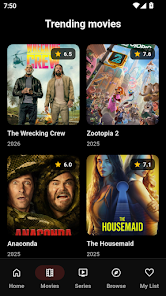
Additional Features
- Movie browsing
- TV show browsing
- Short dramas
- Genre categories
- Title search
- Popular content
- Favorites list
- HD streaming support
- Regular updates
- Lightweight design
- Android optimization
- Clean interface
- Comedy section
- Romance section
- Action section
- Thriller section
- Animation content
- Family entertainment
- Web series
- Online playback
Benefits and Drawbacks
Pros
- Wide mix of entertainment formats
- Simple title and category search
- Favorites for saving interesting content
- HD streaming support
- Designed for Android phones
- Short dramas for quick viewing
Cons
- Contains advertisements
- Streaming needs an internet connection
- Playback depends on available content sources
- APK copies from unknown sources may be risky
- Different apps may use the same NetPrime name
Tips for a Better Experience
- Use a stable Wi-Fi connection for longer viewing sessions.
- Keep enough free storage for normal app operation.
- Check the developer name before installing an APK.
- Use search when you already know the title.
- Use categories when you want to discover something new.
- Save interesting titles to favorites.
- Keep the application updated when an official update is available.
- Avoid modified APK files from unfamiliar sources.
Is NetPrime Safe to Install?
Safety depends heavily on where the application comes from. The current Google Play listing provides a more controlled installation route than downloading an unknown APK file from a random website. Google Play currently identifies YEARD LLC as the developer and states that data is encrypted in transit; its developer-provided safety information also says the app may share device or other IDs with third parties.
For that reason, users should check the developer, permissions, reviews, and source before installation. Do not assume that every APK carrying the same name is the same application.
Final Thoughts
NetPrime APK is built around a simple idea: give Android users different types of entertainment in one place. Movies, TV shows, short dramas, search tools, categories, favorites, and HD support make the app easy to explore. Its current Google Play listing confirms that the application is still being updated in 2026.
The most important point is to identify the correct application before installing it. Several products and websites use similar names, so checking the developer and source matters. Once that is clear, the app offers a straightforward way to browse different entertainment options from an Android device.
FAQs
You can find movies, TV shows, web series, and short dramas across different genres.
Yes, the favorites option lets you keep selected titles for easier access later.
Yes, HD streaming is supported for compatible content.
Yes, you can search by title instead of browsing the full catalog.
The app focuses on online streaming, so an internet connection is needed for playback.